0.2.7 The dial shows your apps

Your quiet place
to focus.

A focus timer for Mac, with sound built in.

macOS 26+ No account Data stays on your Mac

25:00

Set a time and start. Each app you use paints the dial.

See where your
focus went.

While you focus, Sogon quietly notes which app is in front. When the session ends, you see every app you touched, in order, and where the minutes actually went.

Focus RecordSaturday, Nov 21

9:53 PM –

0 min focus1 app

There's a sound for that.

Waves, rain, fire, jazz and lo-fi play the moment you open Sogon, each with a painting. Press play to hear one here.

Stays on your Mac.

A focus app sees how you work. So Sogon keeps that to itself.

DataStoredSent
Focus sessionsThis MacNever
App usageThis MacNever
Window titles opt-inThis MacNever
SummariesThis MacNever
AccountNoneCloud syncNoneAnalyticsNone

Your record is yours

Focus activity, usage segments, and summaries are stored on your device. There's no account to create and nothing to sync.

No AI model

Summaries come from simple local rules, not a language model. Nothing is sent anywhere to write them.

Screens aren't kept

When you allow screen context, images are read in memory and thrown away. Only short text is saved.

Don't break your flow.

Sogon stays out of the way until you need it.

Menu bar timer

Glance at the time left without switching windows. Pause, resume, or start over from the menu bar.

Breaks that keep time

Focus for up to 120 minutes. Breaks follow the lengths you set, and can start on their own.

A mini player

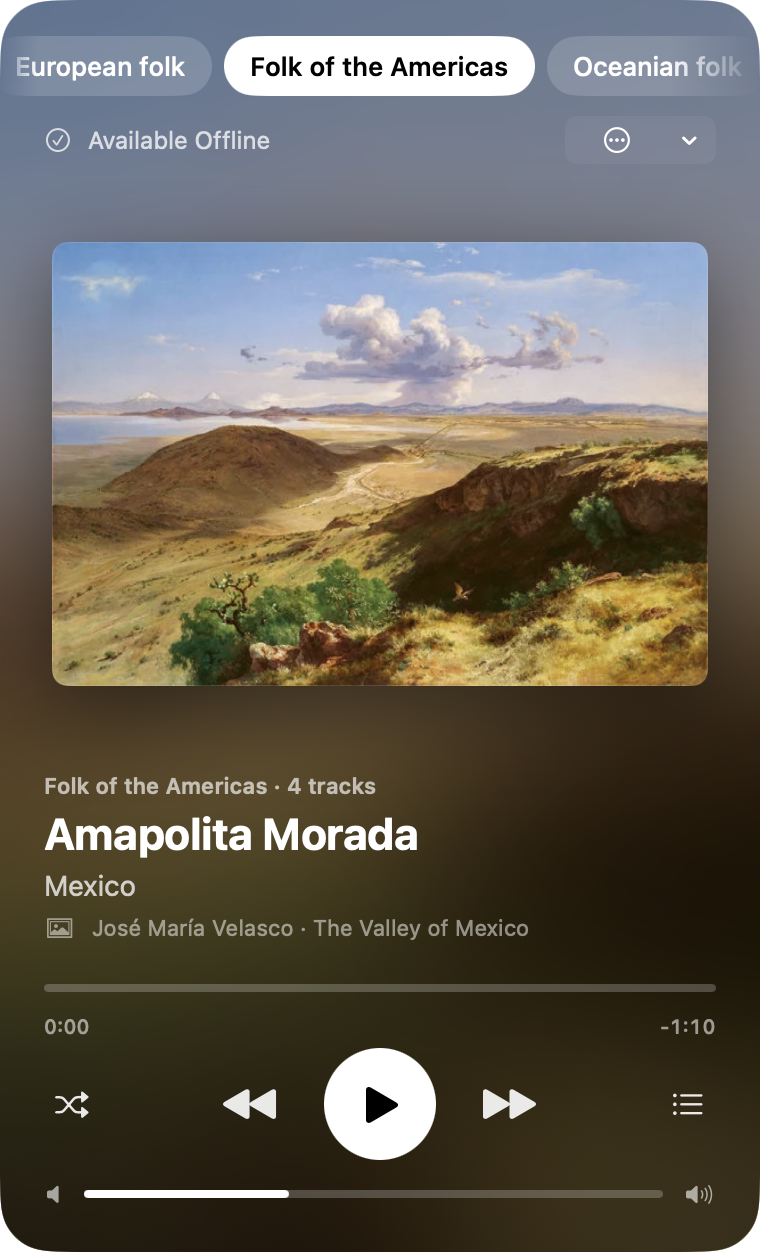
A small floating player with the track, its painting, and the controls you need. Nothing more.

A painting for
every track.

Every track comes with its own painting. 115 more classical and folk pieces stream when you want them, and you can keep them for offline listening.

Questions.

What do I need to run Sogon?

A Mac with macOS 26 or later. Sogon runs on both Apple Silicon and Intel. Download the disk image and drag Sogon to Applications.

How do I update Sogon?

If you use 0.2.5 or earlier, quit Sogon, download the new disk image, and replace Sogon in Applications. Starting with 0.2.6, Sogon checks automatically. To check manually, choose Sogon → Check for Updates… in the Mac menu bar.

Does Sogon send my activity anywhere?

No. Focus activity and screen text stay on your device. Sogon connects to its servers to check for app updates and download extra music and cover thumbnails.

Does Sogon use AI?

No. Session summaries are written by local rules from the window titles you saw most. There's no AI model in the app.

What gets saved when I turn on screen context?

Window titles, short excerpts, usage segments, and summaries. Screen images are read in memory and discarded. Protected-content filtering is heuristic, so review excerpts before you share them.

Does it work offline?

Yes. The 15 built-in sounds ship inside the app. Classical and folk pieces stream on demand, and you can keep them on your Mac to listen offline.

Where does the music come from?

The nature sounds are synthesized. The jazz and lo-fi tracks were composed for Sogon. Moseum recorded the classical and folk pieces from public-domain scores.
Drop into focus.

Let the noise settle. Everything else can wait.

Download for Mac macOS 26 or later